Flutter Animated Login & Signup & Reset Password with Firebase Authentication

Flutter Animated Login & Signup ( Google or Email/Password) & Reset Password with Firebase Authentication Bloc ( Cubit )
📷 App Demo
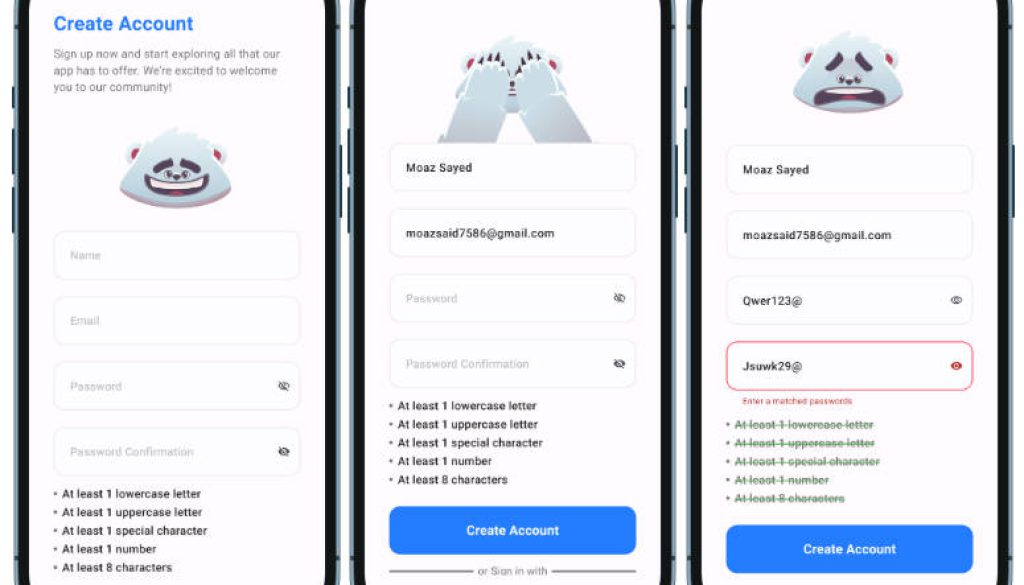
SignUp using Email & Password Screen
SignUp using the Google Account Screen ( After Select Account )
Login Screen
Reset Password Screen
Home Screen
No Internet Connection Screen
A Flutter project implementing animated login, signup, and password reset screens using Firebase authentication. The project also includes Google sign-in integration and utilizes various dependencies like awesome_dialog, firebase_auth, firebase_core, flutter_screenutil, font_awesome_flutter, gap, google_sign_in, and rive.
Features
- Animated UI: Utilizes the bear headless animation for a visually appealing user interface.
- Firebase Authentication: Implements email and password authentication using Firebase.
- Google Sign-In: Allows users to sign up or log in using their Google accounts.
- Responsive Design: Uses
flutter_screenutilfor responsive UI design across various screen sizes. - Custom Dialogs: Integrates
awesome_dialogfor custom dialogs in the app.
Getting Started
Follow these instructions to get the project up and running on your local machine.
Prerequisites
Installation
-
Clone the repository:
git clone https://github.com/MoazSayed7/Flutter-Animated-Auth-Screens-Firebase-Login-SignUp-Reset-SignWithGoogle.git -
Navigate to the project directory:
cd Flutter-Animated-Auth-Screens-Firebase-Login-SignUp-Reset-SignWithGoogle -
Install dependencies:
flutter pub get -
Set up Firebase for your project by following the Using Firebase CLI.
-
Run the app:
flutter run
Dependencies
- awesome_dialog
- cachednetworkimage
- firebase_auth
- firebase_core
- flutter_bloc
- flutter_screenutil
- flutter_offline
- flutter_svg
- gap
- googlesignin
- rive